PRISMA por dentro: o que cada controle faz, e por que foi feito assimInside PRISMA: what each control does, and why it was built that way
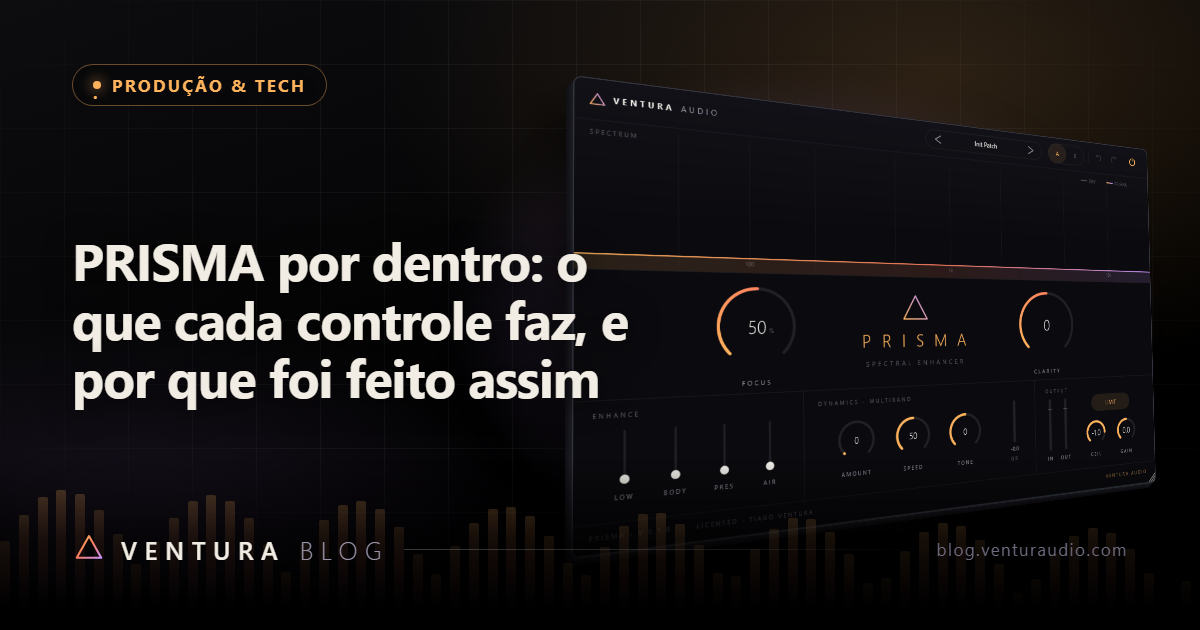
Este texto é a Ventura Audio falando do próprio produto, então vale começar avisando: somos parte interessada. Por isso ele não vai tentar convencer ninguém. Vai fazer outra coisa, que é abrir o PRISMA e mostrar os números reais de cada controle, as frequências, as faixas e os limites, junto do motivo de cada escolha.
Se depois disso ele servir pro seu trabalho, ótimo. Se não servir, você vai saber exatamente por quê, que é mais útil que qualquer argumento de venda.
O problema que ele resolve
Abrir o topo de uma mixagem é fácil. Abrir sem deixar aquele agudo vidrado que cansa o ouvido em dois minutos é que é difícil.
O caminho comum é subir um shelf de agudos e torcer. Funciona no primeiro instante e cobra depois, porque um shelf sobe tudo que existe naquela região, inclusive sibilância, ruído de sala e o brilho artificial de amostras já processadas.
O PRISMA é um enhancer espectral, e a ideia por trás dele é somar material novo em pontos escolhidos em vez de amplificar o que já está lá.
Enhance: quatro faixas, e elas só somam
São quatro controles, cada um numa região com função definida:
- Low, shelf em 90 Hz, até +6 dB. Peso, não grave médio.
- Body, sino em 250 Hz com Q 0.7, até +4.5 dB. Corpo, a região que some quando a mixagem fica fina.
- Presence, sino em 3 kHz com Q 0.7, até +6 dB. Onde a voz e o ataque aparecem.
- Air, shelf em 12 kHz, até +9 dB. Brilho de verdade, acima da região onde mora a sibilância.
Repare no teto de cada um. Eles não são iguais de propósito. Air aceita mais porque 12 kHz perdoa, e Body aceita menos porque 250 Hz é onde a mixagem embola primeiro.
E aqui está a decisão que mais gera pergunta: as quatro faixas só somam. Não dá pra cortar com elas.
Isso foi escolhido, não esquecido. Enhancer serve pra acrescentar. Corte é trabalho de equalizador, e misturar as duas funções no mesmo painel produz o vício mais comum de mixagem, que é subir uma coisa, cortar outra pra compensar, e chegar depois de meia hora num lugar pior que o início, sem conseguir voltar. Tirando o corte, o pior que pode acontecer é você exagerar e ouvir na hora.
Clarity: um tilt com pivô em 700 Hz
Um controle só, indo de menos 6 a mais 6 dB, girando a mixagem inteira em torno de 700 Hz. Pra um lado ele sobe o agudo e baixa o grave na mesma medida. Pro outro, o contrário.
Tilt existe porque a pergunta mais frequente numa mixagem não é "qual frequência está sobrando", é "isso está escuro ou claro demais". Essa pergunta se responde com um gesto, e o tilt é esse gesto. Como ele desce de um lado o quanto sobe do outro, o volume geral quase não muda, e você julga o timbre em vez de julgar o volume.
Focus: exciter paralelo, não distorção no sinal
O Focus tira uma cópia do sinal, filtra deixando passar acima de 1,5 kHz, satura essa cópia com uma curva suave, e mistura de volta por fora.
Duas coisas importam nisso.
Ele é paralelo. O sinal original continua intacto por baixo. O que você ouve é o material saturado somando, não o seu áudio substituído por uma versão distorcida.
No máximo, ele entra a 35 por cento. Com o botão em 100, a cópia excitada soma a pouco mais de um terço. Esse teto é uma trava proposital. Um exciter com alcance total é um plugin que estraga mixagem em dois segundos, e a diferença entre 90 e 100 no botão deixaria de ser musical. Você perde a possibilidade de destruir, e ganha uma faixa inteira onde cada valor faz sentido.
Dynamics: compressor de três bandas
Três faixas, divididas em 180 Hz e 2,2 kHz, com filtros Linkwitz-Riley, que somam de volta sem furo na resposta.
Três controles governam tudo: Amount decide quanta compressão, Speed decide a velocidade de reação, e Tone decide se ela pesa mais no grave ou no agudo.
A razão de existir uma seção de dinâmica dentro de um enhancer é simples. Somar material aumenta pico, e pico aumentado come espaço. O compressor multibanda devolve esse espaço na região em que ele foi consumido, em vez de apertar a mixagem inteira por causa de um brilho que você adicionou nos agudos.
Com o Amount em zero, a seção inteira é ignorada no processamento. Ela não fica passando sinal à toa.
O limitador vem ligado
Sai de fábrica ligado, com Ceiling ajustável.
Isso é assumidamente uma opinião nossa. Um plugin que soma energia e sai de fábrica sem proteção entrega um pico acima do teto pra quem só queria dar uma olhada no que ele faz. Preferimos o contrário, que é proteger por padrão e deixar você desligar se quiser conduzir na mão.
O espectro em tempo real
A tela mostra o espectro enquanto o áudio passa.
Não é enfeite. As quatro faixas do Enhance têm frequências fixas, então ver o espectro é ver se a região que você está reforçando tem material ali pra ser reforçado. Subir Air numa fonte que não tem nada acima de 10 kHz sobe ruído, e o gráfico mostra isso antes do ouvido cansar.
Onde ele entra
No canal, ele funciona como acabamento depois do equalizador corretivo. Corte primeiro o que sobra, com EQ, e só então acrescente com o PRISMA. Na ordem inversa você acrescenta e corta a mesma coisa.
No barramento, cuidado com o Focus. O que parece discreto numa fonte só vira muito quando incide sobre a mixagem inteira.
O resto
VST3 e standalone, licença perpétua, e ele está na loja junto do VOCALX e do LUME.
E se você tem uma pergunta técnica que este texto não respondeu, ela é bem-vinda pela página de Contato. Detalhe de implementação que ninguém pergunta costuma ser detalhe que ninguém precisava, e a gente prefere descobrir isso por pergunta em vez de por adivinhação.
This text is Ventura Audio talking about its own product, so it is worth saying up front: we are an interested party. That is why it will not try to convince anyone. It does something else, which is to open PRISMA up and show the real numbers behind every control, the frequencies, the ranges and the limits, along with the reason for each choice.
If it turns out to suit your work, great. If it does not, you will know exactly why, which is more useful than any sales argument.
The problem it solves
Opening the top of a mix is easy. Opening it without that glassy high end that tires your ears in two minutes is the hard part.
The common route is to raise a high shelf and hope. It works for a moment and charges you later, because a shelf raises everything in that region, including sibilance, room noise and the artificial sheen of already processed samples.
PRISMA is a spectral enhancer, and the idea behind it is to add new material at chosen points rather than amplify what is already there.
Enhance: four bands, and they only add
Four controls, each in a region with a defined job:
- Low, shelf at 90 Hz, up to +6 dB. Weight, not low mids.
- Body, bell at 250 Hz with Q 0.7, up to +4.5 dB. Body, the region that disappears when a mix goes thin.
- Presence, bell at 3 kHz with Q 0.7, up to +6 dB. Where voices and attacks show up.
- Air, shelf at 12 kHz, up to +9 dB. Real brightness, above the region where sibilance lives.
Notice the ceiling on each one. They are deliberately unequal. Air takes more because 12 kHz forgives, and Body takes less because 250 Hz is where a mix clogs first.
And here is the decision that draws the most questions: the four bands only add. You cannot cut with them.
That was chosen, not forgotten. An enhancer is for adding. Cutting is an equaliser's job, and mixing the two functions into one panel produces the most common mixing vice there is, which is raising one thing, cutting another to compensate, and arriving half an hour later somewhere worse than where you started, with no way back. Take away the cut and the worst that can happen is that you overdo it and hear it immediately.
Clarity: a tilt pivoting at 700 Hz
A single control, running from minus 6 to plus 6 dB, rotating the whole mix around 700 Hz. One way it lifts the highs and lowers the lows by the same amount. The other way, the reverse.
Tilt exists because the most frequent question in a mix is not "which frequency is excessive", it is "is this too dark or too bright". That question is answered with one gesture, and the tilt is that gesture. Since it lowers one side by as much as it lifts the other, overall level barely moves, and you judge tone instead of judging loudness.
Focus: a parallel exciter, not distortion on your signal
Focus takes a copy of the signal, filters it to pass above 1.5 kHz, saturates that copy with a soft curve, and mixes it back alongside.
Two things matter there.
It is parallel. The original signal stays intact underneath. What you hear is saturated material adding on top, not your audio replaced by a distorted version.
At most, it comes in at 35 percent. With the knob at 100, the excited copy adds at a little over a third. That ceiling is a deliberate lock. An exciter with full range is a plugin that ruins a mix in two seconds, and the difference between 90 and 100 on the knob would stop being musical. You lose the ability to destroy, and gain an entire range where every value means something.
Dynamics: a three band compressor
Three bands, split at 180 Hz and 2.2 kHz, using Linkwitz-Riley filters, which sum back with no hole in the response.
Three controls govern everything: Amount decides how much compression, Speed decides how fast it reacts, and Tone decides whether it leans on the lows or the highs.
The reason a dynamics section exists inside an enhancer is simple. Adding material raises peaks, and raised peaks eat headroom. A multiband compressor returns that headroom in the region where it was consumed, instead of squeezing the whole mix because of brightness you added up top.
With Amount at zero, the entire section is skipped in processing. It does not sit there passing signal for nothing.
The limiter ships enabled
It comes on by default, with an adjustable Ceiling.
That is openly an opinion of ours. A plugin that adds energy and ships without protection hands a peak over the ceiling to someone who only wanted a quick look at what it does. We prefer the opposite, protecting by default and letting you switch it off when you want to steer by hand.
The real time spectrum
The display shows the spectrum while audio passes.
It is not decoration. The four Enhance bands sit at fixed frequencies, so seeing the spectrum means seeing whether the region you are reinforcing has material there to reinforce. Raising Air on a source with nothing above 10 kHz raises noise, and the graph shows that before your ears get tired.
Where it belongs
On a channel, it works as a finishing stage after corrective EQ. Cut what is excessive first, with an equaliser, and only then add with PRISMA. In the reverse order you add and cut the same thing.
On a bus, watch the Focus. What seems subtle on a single source becomes a lot when it lands on the whole mix.
The rest
VST3 and standalone, perpetual licence, and it is in the store alongside VOCALX and LUME.
And if you have a technical question this text did not answer, it is welcome through the Contact page. An implementation detail nobody asks about is usually a detail nobody needed, and we would rather find that out by being asked than by guessing.
Plugins que você enxergaPlugins you can see
Conheça o PRISMA e o catálogo Ventura Audio.Meet PRISMA and the Ventura Audio catalog.
IR PARA A LOJAGO TO STORE